
The instructions can be read here
When I go to a driver allocation, it tells me table CDV has one or more non-structural indexes open. This will fix it.
Fix for: table CDV has one or more non-structural indexes open.
Solution:
How to download the file: fixcd.exe
Right-click on the link below. Then choose: Save target as: (or Save Link As…)
Important: use the right-click on your mouse, not the left-click!
Right-click here to get the fix File name is: fixcd.exe 11 kb
Instructions:
Copy it into the problem model. For example, if the problem model is fixabc2. It is in the Models folder under ABC3.
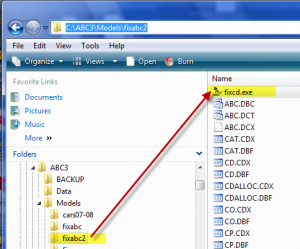
Double-click the fixcd file and run it.
The problem model should now work.
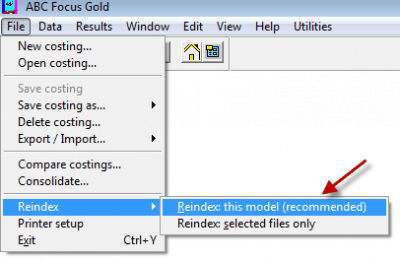
Open the model and get to the map. Then choose Reindex.
How to re-install the software
This assumes that the existing location will be the same after the re-install.
Visual Cash Focus example (other software is similar):
If Visual Cash Focus is installed in C:\VCF8, then rename this folder. E.g rename to C:\VCF8_old.
Install the software from the CD or setup program that was supplied initially.
Start the software and register as normal. Close the software.
Copy the models: copy all the folders under C:\VCF8_old\Models to C:\VCF8\Models
In C:\VCF8_old\Data there are 3 files that are called Model, namely model.dbf, model.fpt, model.cdx. Copy these three files into C:\VCF8\Data.
Start the software.
Open a model and get to the map.
Run the option: Check shared tables. It is under the Utilities menu, under Technical utilities.